Generate content in-context
A tool that knows where you triggered it from, what data is relevant and which actions are recommended.
01 / ServiceNow · Now Assist Context Menu
I led the design of a reusable contextual AI experience that helps people create and refine content within their flow of work, growing an initial resolution-notes request into a capability that could serve workflows across ServiceNow.
01 Reframing the request
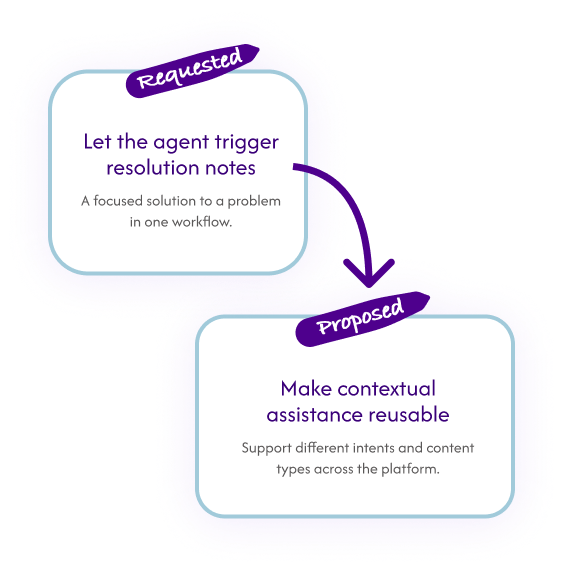
Resolution notes were already generated automatically, but the underlying records often didn’t contain enough meaningful information. The initial request was simple. “Give agents control over when generation happened.”
As I dug into the problem, I realized it wasn’t really about resolution notes. Writing and documenting work takes time, and that challenge shows up across many workflows and personas. When important context never gets captured, it also leaves AI with less reliable information to work from.
That shifted the opportunity. Instead of designing a control for one field, I explored a reusable tool that could help people create better content in the moment: starting from their intent, refining what they had already written, or generating content when enough context was available.
Because this wasn’t an agent-only problem, I designed it with the potential to scale across the platform from the beginning.
02 Validate and build support
I created a lightweight concept and shared it early across platform and business-unit design teams. Their use cases showed the interaction could support far more than resolution notes.
I used that evidence to build support with design leadership and product, helping make the case for prioritizing a shared component rather than a one-off feature.
Create a lightweight prototype to socialize the idea.
Share it with platform and BU designers and gather broader use cases.
Use those examples to show this was a repeated platform need, not a one-off feature.
Secure design and product backing to prioritize a shared component.
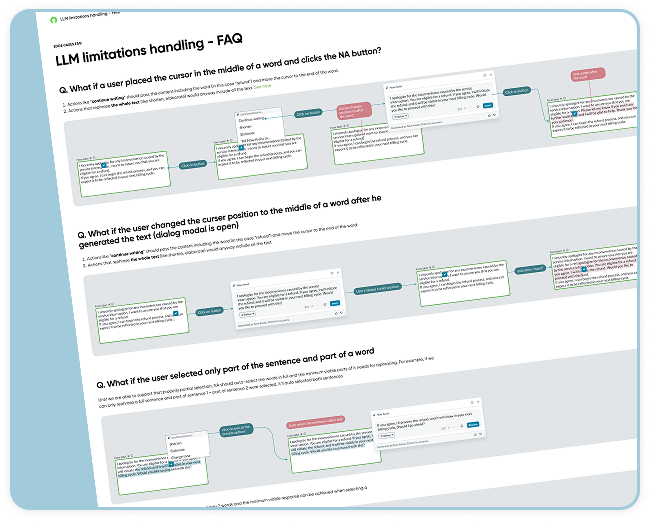
03 Challenges and decisions I made
04 Impact

Extended contextual AI assistance beyond fulfillers (my domain) to end users, admins, builders, and other personas, bringing AI into their existing workflows.

Established a reusable interaction model that teams could adopt across products. Even teams that couldn’t use the original component, like the Builder team, chose to implement the same experience in their own technology.

A reusable platform capability adopted by approximately 400 customers across 36+ business units, extending the investment beyond its original use case.